Kwibo vs Vyapar, myBillBook and Zoho: an honest GST billing comparison
A fair, specific comparison of Kwibo, Vyapar, myBillBook and Zoho Invoice for Indian shopkeepers — login, price, where your data lives, and which ones actually print the bill in your customer's language.
A shop owner I know hands every customer a bill the customer can’t read. He runs a small trading business, his buyers are local traders who read Hindi, and his billing app prints “Tax Invoice”, “CGST”, “Taxable Value” in English. The app’s own menus are in Hindi. The bill is not. So the customer signs a piece of paper they can’t check.
That gap is the whole reason Kwibo exists, and it’s the first thing worth checking before you pick any GST billing tool. Most comparisons rank these apps on invoice templates and stock management. For a one-person shop that just needs to hand someone a correct bill, three things decide it: can you start without an account, does “free” stay free, and can your customer read what you gave them.
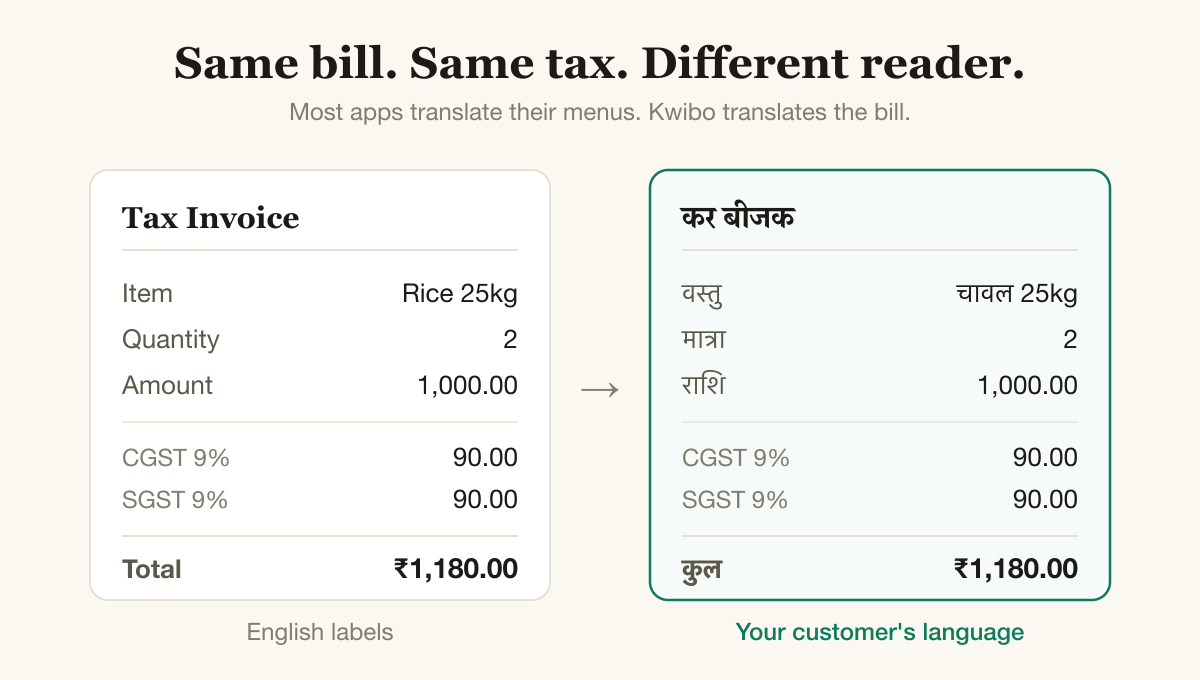
Same bill, same tax math. The difference is whether the labels print in a language your customer reads.
The short version
Here is how Kwibo, Vyapar, myBillBook and Zoho Invoice line up on the things that matter to a small Indian shop. The details behind each row are below the table.
| What matters | Kwibo | Vyapar | myBillBook | Zoho Invoice |
|---|---|---|---|---|
| Bill PDF in Indian languages (labels and tax rows, not just the screen) | Yes — 8 languages | Screen only; PDF labels stay English | Screen only; PDF labels stay English | Possible, but you type every label by hand and set up fonts |
| Start without an account or OTP | Yes, no login ever | No — phone number + OTP (app) | No — phone number + OTP | No — account required |
| Free with no watermark and no time limit | Yes | Free tier puts a watermark on the invoice | Free is a 14-day trial | Yes — genuinely free in India |
| Where your billing data lives | On your device | On your device (local-first) | On the company’s servers | On the company’s servers |
| CGST/SGST within a state, IGST across states | Yes | Yes | Yes | Yes |
| Share the bill on WhatsApp | Yes | Yes | Yes | Yes |
No single column wins every row, and the table shows it. Vyapar keeps your data on your device, same as Kwibo. Zoho Invoice is free in India with no catch. Where Kwibo stands alone in this set is the combination: a bill that prints in the customer’s language, with no login and no watermark, while your data stays on your phone.
Vyapar
Vyapar is a capable app, and it gets one big thing right that the cloud tools don’t: it’s local-first, so your data sits on your own device by default. If you care about not handing your records to someone else’s server, that matters.
Two things to know before you rely on the free version. You need a phone number and an OTP to get started, so it isn’t a tool you can just open and use. And the free tier stamps a watermark on the invoice you hand your customer. The watermark goes away on a paid plan. The printed bill also comes out with English labels — the app translates its own screens, not the document your customer holds.
myBillBook
myBillBook is polished and popular, and it covers inventory and reports that Kwibo deliberately doesn’t. If you’re growing into stock management, it’s worth a look.
For just making bills, the friction shows up early. It needs a phone number and OTP to start. The “free” plan is a 14-day trial, not a free tier — after that you choose a paid plan to keep going. Your data lives on myBillBook’s servers, which is convenient for syncing across devices and is also the thing to weigh if a subscription lapses: one Trustpilot reviewer in April 2026 described being locked out and told to renew (around ₹5,000 a year) before they could download their own invoices. And like the others here, the printed bill’s labels stay in English.
Zoho Invoice
Zoho Invoice India is the honest surprise in this group: it’s genuinely free, with no paywall at download and no watermark. If you already live in Zoho’s other tools, it fits.
It does need an account to use, and your data lives in Zoho’s cloud. On language, Zoho goes further than most — you can get a non-English invoice — but you do it by typing every label’s translation yourself and configuring the right font, and Marathi PDF export has a long-running bug thread that has stayed open for years. There’s a real path to a vernacular bill; it’s manual, and it doesn’t always render.
Kwibo
Kwibo does one job: a correct GST bill your customer can read, made in seconds on a phone, with nothing in your way.
You open the site and start. No account, no phone number, no OTP. The PDF prints in the language you pick — Hindi, Marathi, Bengali, Gujarati, Tamil, Telugu, Kannada or English — and that means the labels and the tax rows, not just the app’s menus. GST splits into CGST and SGST within a state and IGST across states, worked out from the state codes. One tap shares the bill on WhatsApp, and it keeps working if your signal drops.
Your bills and clients are saved only on your device. To draw the PDF, the bill details go to the render server, get used to make the document, then are discarded — no account, no database, and the contents are never logged. Because none of your records sit on a server, no one can lock you out of them or charge you to get them back.
What Kwibo isn’t: it’s not accounting software. There’s no inventory, no ledgers, no multi-user setup. If you need those, Vyapar or Zoho will serve you better. If you mostly need to hand a customer a proper bill they can read, that’s the whole point of Kwibo.
So which should you use?
- You want to start right now, free, and hand over a bill your customer can read: Kwibo.
- You want full accounting and inventory, and don’t mind a signup: myBillBook or Zoho.
- You want your data on your own machine and are fine with the app’s setup and watermark on the free tier: Vyapar.
For a small shop, the fastest honest path to a GST bill your customer can actually read is Kwibo — open it and make one, no account needed.