How to calculate GST on a bill, step by step
Work out GST both ways — added on top of a price and pulled out of a price that already includes it — plus the CGST/SGST split, the rounding rule from Section 170, and multi-item bills.
GST maths is short once you know which of two situations you’re in. Either the price you quoted doesn’t include tax and you add it on, or the price already includes tax and you need to pull it back out. Most billing mistakes come from mixing these two up, so they’re worth keeping straight.
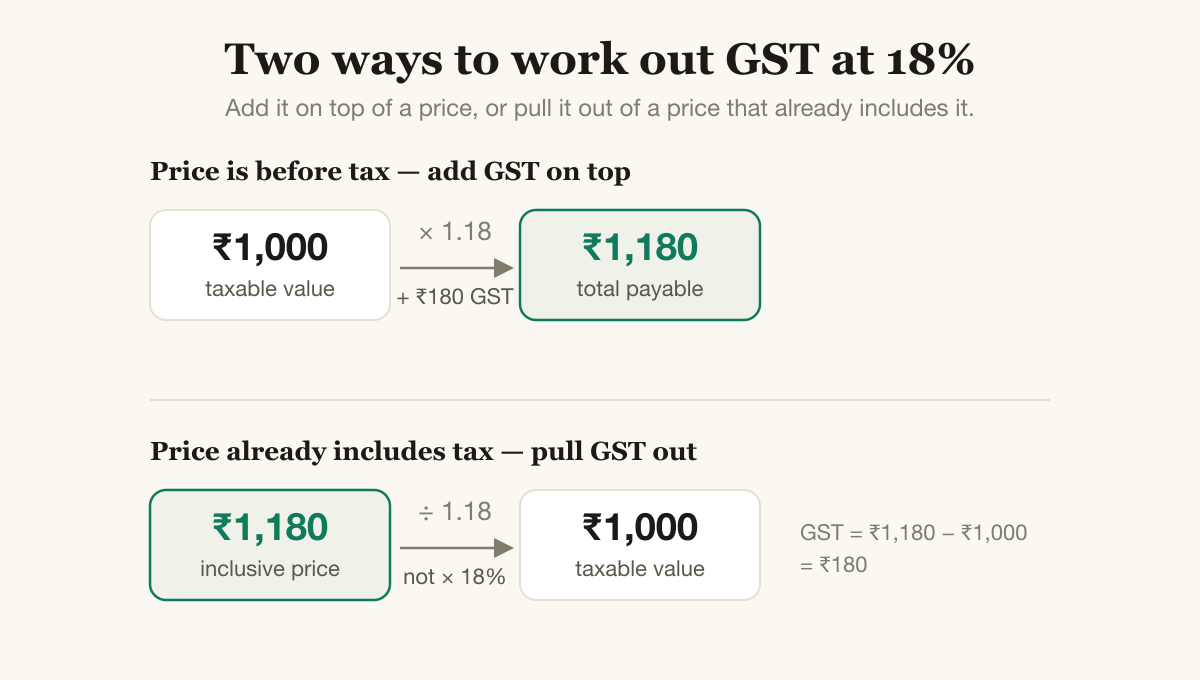
Add GST on top of a price, or pull it out of a price that already includes it. The inclusive case divides — it doesn’t multiply.
Adding GST on top of a price
This is the common case: your price is before tax, and GST goes on top.
GST amount = price × rate ÷ 100
Total      = price + GST amount
A ₹1,000 item at 18%:
| Amount | |
|---|---|
| Price (taxable value) | ₹1,000 |
| GST at 18% | ₹180 |
| Total | ₹1,180 |
Pulling GST out of an inclusive price
Sometimes the price already has tax baked in — a label that reads “₹1,180 all inclusive”, for instance. To show the tax separately on the bill, you work backwards:
Taxable value = inclusive price × 100 ÷ (100 + rate)
GST amount    = inclusive price − taxable value
Starting from ₹1,180 at 18%:
| Amount | |
|---|---|
| Inclusive price | ₹1,180 |
| Taxable value (1,180 × 100 ÷ 118) | ₹1,000 |
| GST | ₹180 |
The mistake to avoid is taking 18% of ₹1,180 directly. That gives ₹212.40, which is too high, because the ₹1,180 already contains the tax. You divide, you don’t multiply.
Splitting into CGST and SGST
For a sale inside your own state, the GST splits in half, one part CGST and one part SGST. So 18% becomes 9% CGST and 9% SGST, and the bill shows both:
| Tax | Rate | Amount |
|---|---|---|
| CGST | 9% | ₹90 |
| SGST | 9% | ₹90 |
| Total GST | 18% | ₹180 |
For a sale to another state it’s a single IGST line at the full 18% — ₹180 — with no split. (If you’re unsure which applies, the CGST/SGST/IGST guide walks through it.)
The rounding rule people get wrong
Tax rarely comes out to a whole rupee, and there’s an actual rule for what to do with the paise. Section 170 of the CGST Act says round the tax to the nearest rupee: 50 paise or more rounds up, less than 50 paise rounds down.
So GST of ₹90.09 becomes ₹90. GST of ₹90.50 becomes ₹91. The rounding applies to each tax component and to the invoice total, and it’s done per bill, not by lopping paise off every line and hoping it adds up. Most billing software keeps the exact paise through the line items and rounds at the end, which keeps the totals honest.
A bill with more than one item
Real bills have several items, sometimes at different rates. The method scales cleanly:
- For each line, work out the taxable value and its GST.
- Group the GST by rate — all the 5% items together, all the 18% items together — so the bill can show the tax for each rate.
- Add up the taxable values for the grand taxable total, add up the tax for the total GST, and combine them for the amount due.
A two-item example, both sold within the state:
| Item | Taxable value | Rate | CGST | SGST |
|---|---|---|---|---|
| Notebook | ₹500 | 5% | ₹12.50 | ₹12.50 |
| Lamp | ₹1,000 | 18% | ₹90 | ₹90 |
| Total | ₹1,500 | ₹102.50 → ₹103 | ₹102.50 → ₹103 |
The bill comes to ₹1,500 taxable, ₹206 GST after rounding, ₹1,706 due. A compliant bill shows the tax broken out by rate, not as one lumped figure — that’s how the buyer (and the tax system) can check it.
One detail on how the amounts print
Indian bills group digits the Indian way: ₹1,00,000 for one lakh, not ₹100,000. The first comma falls after three digits from the right, then every two digits after that. It’s a small thing, but a bill that writes large amounts in the international format reads as foreign to an Indian customer.
Or skip the arithmetic
None of this is hard, but doing it by hand on every bill — the split, the rounding, the per-rate totals, the digit grouping — is exactly the kind of repetitive work that invites a slip. Kwibo does all of it: you enter the price and rate, it calculates the GST, splits CGST and SGST or charges IGST, rounds the way Section 170 says, and prints the amounts in proper Indian format — in the language your customer reads. Free, no login. Type the numbers, get a correct bill.